How to Create Images with Gemini AI 2026: Step-by-Step Guide to Create Trending Birthday AI Photos and Sawan Couple Photos
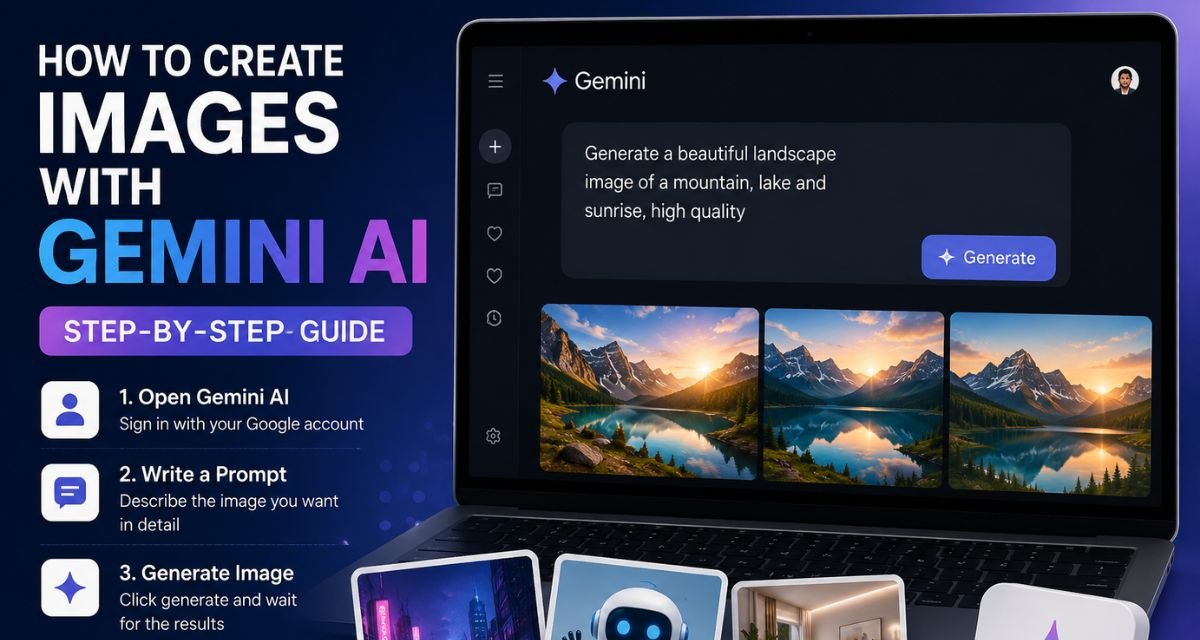
How to Create Images with Gemini AI 2026: To create AI images is now easier than ever with Gemini AI. If you have a Google account, you can use Gemini AI to turn your creativity into beautiful images within a minute. Whether you need a thumbnail YouTube or to make a blog image, or for social media post, or wallpaper, Gemini Ai will create it without using any editing software.
Steps to Create Images with Gemini AI
Step 1: Open the Gemini app or visit the Gemini website and sign in with your Google account.
Step 2: Tap the message box and describe the image you want. Write your idea in simple words, but include enough details. For example, instead of writing “mountain,” try “a snowy mountain during sunrise with a clear blue sky.”
Step 3: Press the Generate button and wait for a few seconds. Gemini will create one or more images based on your prompt.
Step 4: If the image does not look the way you expected, change a few words in the prompt. You can add details like lighting, background, camera angle, colours, or art style. Small changes often give much better results.
Step 5: Once you find the image you like, download it and use it in your blog, presentation, social media post, or personal project.
Gemini AI Sawan Couple Image Prompt
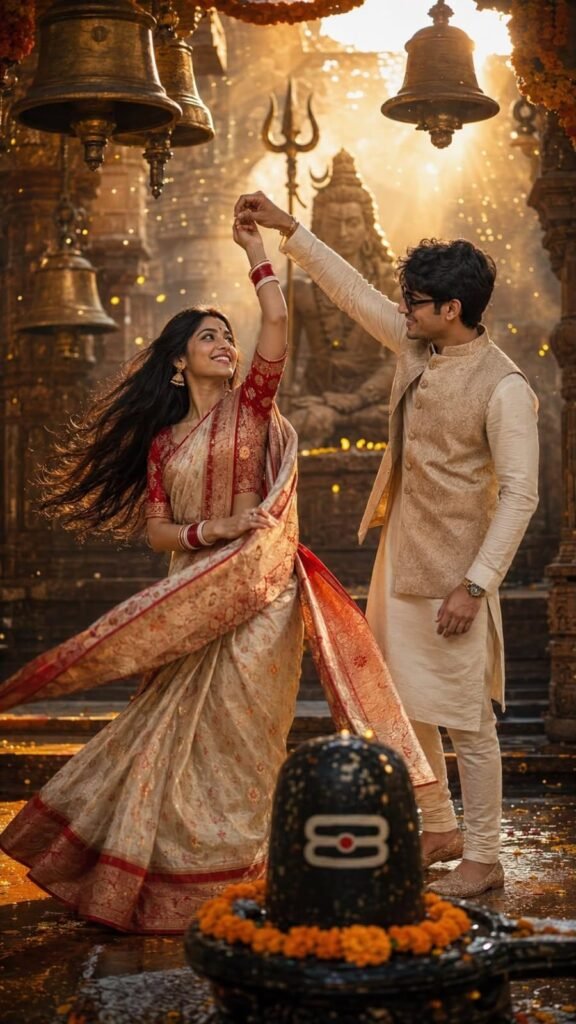
Ultra-realistic cinematic Indian couple portrait inside an ancient Shiva temple during a divine celebration. A smiling young Indian woman is gracefully twirling while her partner gently lifts her hand in a romantic dance pose. She is looking lovingly at him with a joyful expression. She wears a luxurious ivory-gold Banarasi silk saree with intricate red and gold zari woven floral motifs, a broad traditional red border with heavy golden brocade detailing, and a matching half-sleeve red embroidered blouse. Traditional bridal accessories include red glass bangles with white shakha-pola style bangles, gold jhumka earrings, a small red bindi, sindoor, subtle bridal makeup, soft kohl-lined eyes, nude pink lips, and long natural black hair flowing behind her. The man is wearing an elegant cream silk kurta-pajama paired with a richly embroidered champagne-gold brocade Nehru jacket featuring intricate floral patterns, traditional embroidered mojari shoes, a watch, and black sunglasses. He smiles warmly while looking at his wife, holding her hand above her head as she spins. The background features a majestic ancient Shiva temple with grand stone architecture, massive temple bells hanging overhead decorated with marigold garlands, a glowing Shivling adorned with flowers and sacred markings in the foreground, a towering golden silhouette of Lord Shiva with a trishul in the distance, countless floating golden particles, soft incense haze, and warm divine light rays illuminating the scene. Wet reflective stone flooring is covered with scattered marigold petals, enhancing the cinematic atmosphere. Golden hour lighting, warm amber color grading, volumetric god rays, dreamy glow, shallow depth of field, soft bokeh, ultra-realistic textures, highly detailed silk fabric, realistic skin tones, natural expressions, dynamic saree movement, editorial wedding photography,
devotional ambience, HDR, 8K, DSLR quality, 85mm lens, f/1.8, ultra-sharp focus on the couple, premium cinematic composition, vertical portrait,
9:16 aspect ratio.
Gemini AI Birthday Photo Prompt
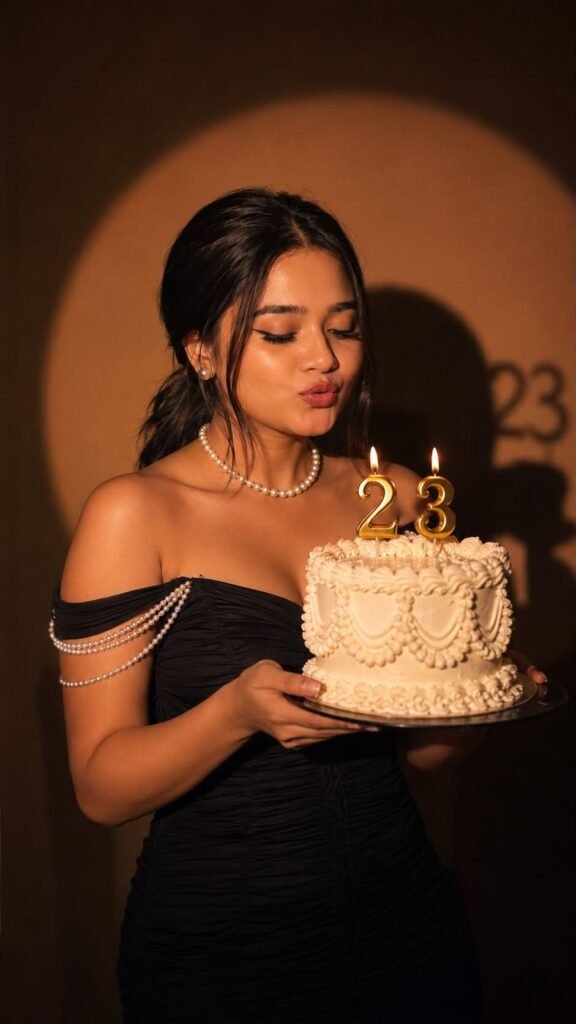
Ultra-realistic cinematic birthday portrait of a young Indian woman holding an elegant vintage white buttercream cake with ornate piping and glowing golden “23” number candles. She is wearing a fitted black off-shoulder ruched evening gown with delicate pearl shoulder chains, a classic pearl choker necklace, and minimal pearl earrings. Her sleek black hair is styled in a low ponytail with a center part and soft face-framing strands. She has soft glam makeup with winged eyeliner, nude lips, and long lashes. Her eyes are closed as she gently blows toward the candles, creating a candid, dreamy moment. Warm spotlight lighting against a dark brown studio background creates a large circular halo and a dramatic shadow of the “23”
candles behind her. Moody luxury editorial aesthetic, high contrast, soft skin tones, realistic candle glow, subtle film grain, shallow depth of field, crisp focus on the subject and cake, premium birthday photoshoot, Vogue-inspired composition, natural skin texture, ultra-detailed, DSLR quality, 85mm lens, f/1.8, 4K
HDR, photorealistic, vertical 9:16 ratio.
Tips for Better Results
A good prompt always creates better images. Mention the subject, background, colours, image style, and mood. If you want a realistic picture, write “photorealistic” or “high-quality.” For creative artwork, mention styles like cartoon, digital art, or 3D illustration. Testing different prompts is the easiest way to learn what works best.
Final Words
Gemini AI makes image creation fast and simple for everyone. You don’t need graphic design experience to create attractive visuals. Just write a clear prompt, make small improvements when needed, and download the final image. After a few tries, writing good prompts becomes easy, and you can create images for almost any purpose within minutes.
